
Condo Directory for Real Estate Websites
Browse Every Condo in Your Market
Your IDX website now includes a full condo building directory. Visitors can explore buildings organized by city and neighborhood, search by building name, or browse directly on an interactive map with location pins.
The directory supports three view modes — a split view with grid and map side by side, a full grid for quick scanning, or a full map for geographic browsing. Each building card shows the building photo, name, price range, and bed/bath/sqft ranges at a glance.
Find the Right Building Fast
The directory comes with advanced filters that go beyond basic price and bedroom counts. Visitors can filter by:
- Amenities — pool, spa, parking, community features
- Views — waterfront, city, garden, and more
- Year Built — narrow down to newer construction or established buildings
- Stories & Total Units — find the right building size
- Price Range — min and max price filters
- Property Status — for sale, for rent, pending, or sold
There's also a draw-on-map feature that lets visitors define a custom geographic area and see only the buildings within it.
Everything About a Building in One Place
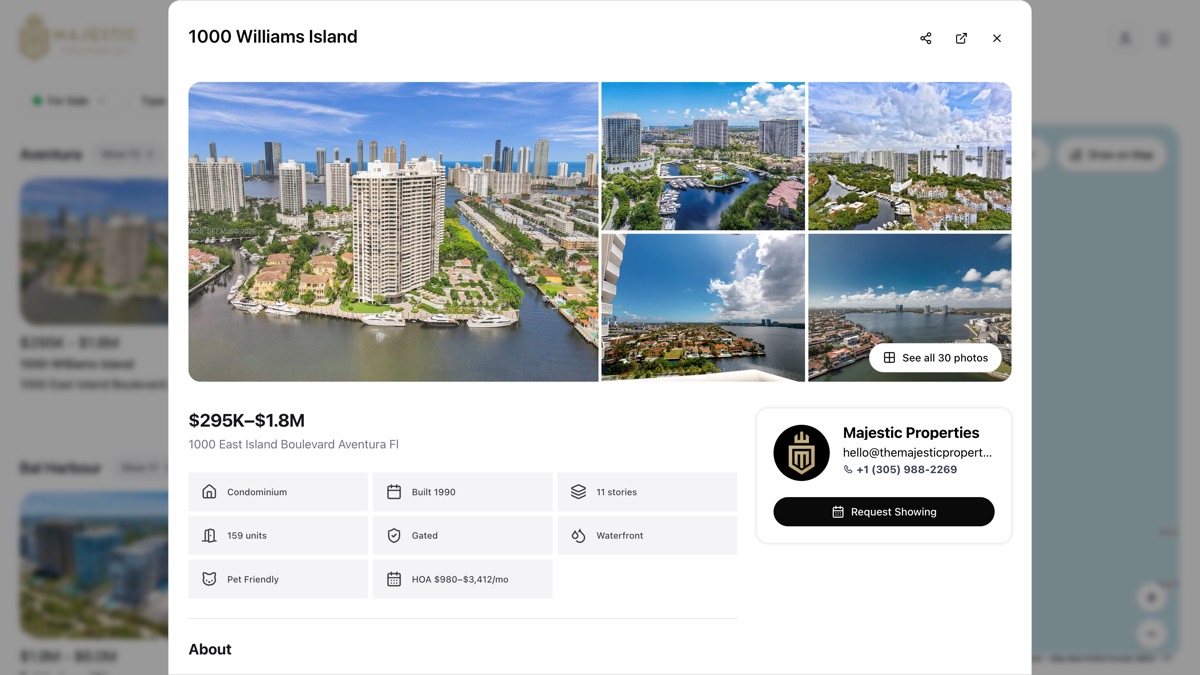
Each building has a detailed profile page with everything a buyer needs. When a visitor clicks on a building, they see:
- Photo gallery with fullscreen viewing
- Building description with key facts like year built, total units, and number of stories
- Features and amenities organized by category — pool, parking, security, views, construction
- Active listings broken down by status — for sale, for rent, pending, and recently sold
- Price per square foot and market statistics
- Location on map with surrounding area context
Make It Look the Way You Want
The condo directory includes 7 display templates so you can match your website's style:
- Grid — clean card layout in rows
- Carousel — horizontal scrolling for a modern feel
- Featured — hero building with supporting grid
- Showcase — premium dark-themed display
- Compact — minimal, space-efficient cards
- Directory — structured list-style layout
- Magazine — editorial-style presentation
Each template supports custom styling — border radius, spacing, title alignment, and a configurable "Show More" button. You can mix different templates across your homepage and building sections.
Save Searches and Feature Them on Your Homepage
Save any building search — area, filters, and status — for quick access later. Saved searches can be displayed directly on your homepage as a section of 8 building cards, giving visitors instant access to curated building collections.
You can also organize saved searches into buckets — custom groups that appear as their own sections on your homepage. This is great for organizing by neighborhood, price range, or building type.
Get Started
The condo directory is ready to use on your IDX website. Go to your Website Builder, add a condo directory section, and start showcasing the buildings in your market.
Ready to showcase your market? See it live →
