

Real Estate Website Launch Checklist
Creating a real estate website means connecting several pieces: your message, authorized property data, useful pages and a reliable way to handle inquiries. A polished homepage is a starting point. A launch is ready when those pieces work together for an actual visitor.
Use this checklist to plan a new website or a migration. The product examples come from Panda's dashboard and documentation; the steps also help you ask better questions when comparing a real estate website builder. The cover is an editorial illustration. The screenshots below show the actual Panda application.
1. Define the visitor and the next step
Write one sentence describing whom the site serves and what you help them do. An individual agent, a brokerage and a team marketing new developments may need different page structures. Choose the actual markets and services you cover before writing location content.
Next, define the primary action: search properties, ask about a listing or contact your team. A visitor should understand that action without reading your entire biography. Give secondary audiences a clear route through navigation rather than squeezing every service into the hero.
Ready when: your homepage explains your focus, and its main action leads somewhere useful.
2. Confirm MLS access before promising a launch date
List the MLS boards you need, your account requirements and any approval still outstanding. An IDX website combines website tools with listing access; buying a design or a subscription does not automatically complete MLS authorization.
Ask which boards are supported, whether separate charges apply and who handles the setup. If you are migrating, confirm how the new search experience will replace the old one. The IDX and MLS guide explains the distinction, while the cost guide helps you separate setup, recurring software and additional charges.
Ready when: coverage and responsibilities are confirmed for your project, with unresolved items written down.
3. Build the pages people actually need
Start with a focused structure: home, profile or about, property search, contact, and team pages when relevant. Add new-development or other specialist content only when it supports your business. Each page should answer a different visitor question.
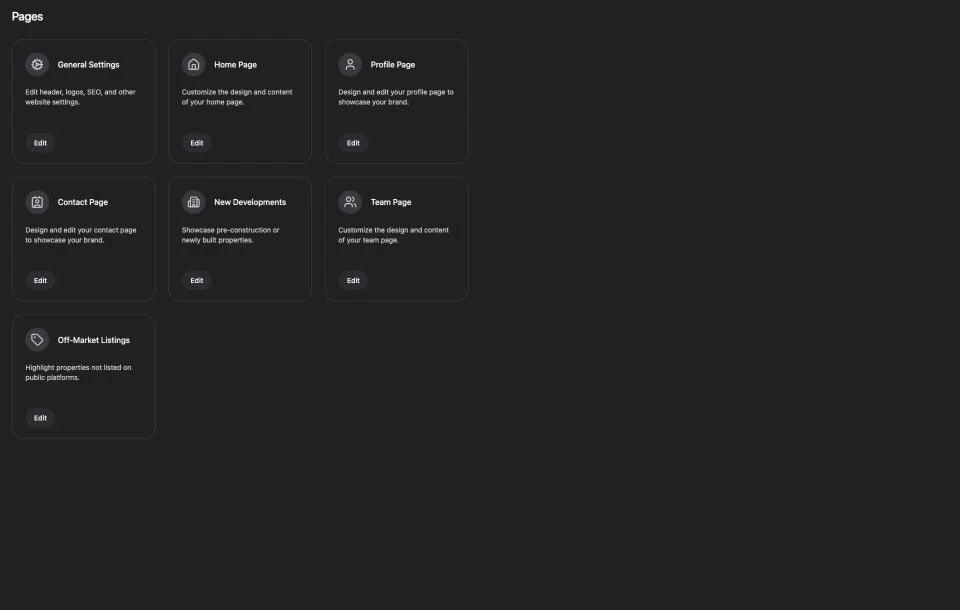
For a migration, inventory important old URLs before changing them. Match each valuable old page to a relevant new destination. Avoid sending every removed URL to the homepage simply because it is convenient; visitors still need an answer to the question that brought them there.
Ready when: navigation works, important content has a destination and there are no placeholder pages in the public journey.
4. Prepare branding and images for desktop and mobile
Gather the logo files, headshot and property or neighborhood images you are allowed to publish. Keep the subject useful to the page. A real product screenshot can explain a control; an editorial illustration can introduce a concept. Neither should pretend to prove sales results or represent a customer property it does not show.
Use image dimensions that fit the layout, compress files and describe meaningful visuals with alternative text. Check crop and legibility on a phone. A wide desktop banner may hide its subject on a narrow screen, while text baked into an image can become unreadable.
Panda's homepage documentation and general settings guide explain where to manage site visuals and branding. Current controls may differ from an older tutorial, so review the interface before saving a change.
Ready when: the logo, navigation and key imagery remain clear on both desktop and mobile.
5. Walk through property search as a visitor
Open the public site and try a realistic search in a market you serve. Review the results, open a property and find the next contact action. Check the phone layout, not only the desktop preview.
If you use a property collection or a specialist landing page, confirm that it displays the intended content and that its links work. Explain the market in your own useful language rather than repeating interchangeable text for dozens of locations. Check listing attribution and display requirements with your provider or MLS where applicable.
Ready when: a visitor can go from a relevant search to property details and an inquiry without a dead end.
6. Test the form and agree on follow-up
Give each form a purpose and ask for information that helps the next conversation. Make field labels, required inputs and the confirmation message understandable. The custom contact form tutorial walks through Panda's form creation workflow, including rows, fields and page assignment.
Before launch, arrange an authorized test with the people who receive inquiries. Confirm where the request is stored, who receives it and how the team will respond. An attractive button or a success message alone is not proof that the whole delivery path works.
If you use a real estate CRM, review the contact-management workflow included in your plan. Decide who owns new inquiries and how they are organized. Keep the process concrete before adding more automation.
Ready when: the expected recipients can account for a test inquiry from submission through follow-up.
7. Review titles, descriptions and internal links
Write a descriptive title and summary for each important page. Mention its actual subject and brand naturally. Give different pages different jobs: your website builder page explains editing tools, your IDX page explains the search offering, and your pricing page answers purchase questions.
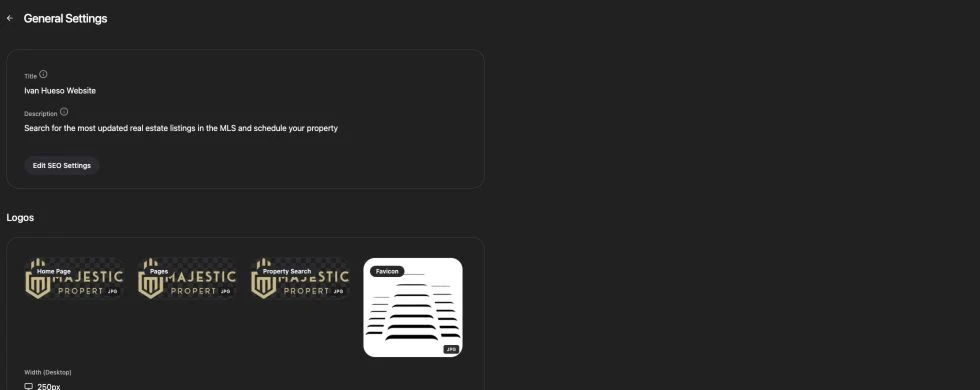
Link related pages where the next step makes sense. A setup guide can link to documentation and pricing; a product page can link to a tutorial and a demo. Avoid repeating the same keyword in every link or creating nearly identical pages for minor keyword variations.
Ready when: visitors can navigate between related questions, and metadata accurately describes each destination.
8. Connect the domain and verify the public result
Confirm who controls the domain and who is authorized to change its records. Follow your provider's instructions and preserve unrelated services such as email. Do not remove existing DNS records without understanding what depends on them.
After the domain is connected, check the actual public URL, HTTPS, navigation, images and forms. Verify the intended canonical domain and any migration redirects. Your editor preview and the published website are separate things to check.
Ready when: the public domain serves the intended version and the important visitor journeys work there.
9. Prepare measurement and search discovery
Use Search Console to review how Google discovers the site and Analytics to understand visitor activity. A sitemap helps communicate your URLs. Requesting indexing is a request for Google to consider a page, not confirmation that it is indexed or will rank.
Choose a useful business event such as a successfully received inquiry, then validate what your tracking actually records. Keep personal details out of analytics event parameters. Compare equivalent date ranges after launch and distinguish brand searches from commercial discovery.
Google's URL inspection documentation explains inspection and indexing requests. Its SEO Starter Guide provides the broader discovery and content fundamentals.
Ready when: measurement is configured, its limits are documented and there is a plan to review real inquiries alongside traffic.
A compact launch sign-off
- Website owner: approves content, images and business details.
- Setup lead: confirms MLS, domain and migration responsibilities.
- Sales or support: verifies the inquiry destination and follow-up process.
- Marketing: checks important pages, metadata, measurement and search discovery.
Keep a short log of the date, changed URLs, verification results and unresolved items. This makes the next review useful instead of restarting the investigation from scratch.
If you are planning a Panda website, explore the website builder, review current plans and request an IDX demo with your MLS and website requirements. Use the demo to confirm scope and responsibilities before choosing a launch date.
